Towji Text Alerts consent flow
Last updated: October 1, 2026
Towji Text Alerts, also described as Towji Vehicle Discovery Alerts, are optional transactional notifications sent when a monitored vehicle may match a tow record. Towji AI, Inc. operates the program. This page documents the mobile app and signed-in web dashboard enrollment flows for carrier and messaging-compliance review. This page itself does not collect phone numbers or SMS consent; enrollment happens in the mobile app or the signed-in web dashboard.
Program rules shown before opt-in
Text alerts are optional and off by default.
Phone verification and SMS consent are separate actions.
Consent is not a condition of any purchase.
Messages are recurring automated Towji tow-result alerts.
Message frequency varies. Message and data rates may apply.
Reply STOP to opt out or HELP for help.
Exact mobile consent sequence
- 1
Sign in to the Towji mobile app and open Settings → Notifications → Text alerts.
- 2
Enter a mobile number with country code and request an SMS verification code.
- 3
Enter the verification code to confirm ownership. Alerts remain off after verification.
- 4
Review the recurring automated text-alert disclosure and the linked Privacy Policy and Terms.
- 5
Select the separate, initially unchecked consent checkbox and tap Enable text alerts.
Exact web consent sequence
Signed-in Dashboard → Monitoring → Text alerts. Enrollment is available to eligible accounts where the Text alerts card is enabled. Consent remains optional.
- 1
Sign in to Towji on the web and open Dashboard → Monitoring → Text alerts.
- 2
Enter a US mobile number and select Send code.
- 3
Enter the verification code and select Confirm. Alerts remain off after verification.
- 4
Review the same recurring automated text-alert disclosure and the linked Terms and Privacy Policy.
- 5
Tick the separate, initially unchecked consent checkbox, then select "Turn on text alerts".
Before opting in, users can review the Terms and Privacy Policy. The checkbox starts unchecked, and Turn on text alerts is disabled until it is ticked. Users can select Turn off on the same card or reply STOP to an alert to opt out.
Privacy-safe Build 36 release-candidate UI illustrations
These illustrations reproduce the current Build 36 release-candidate mobile labels, controls, and states with fictitious, masked data so reviewers can inspect the authenticated flow without an app account. They contain no real phone number, verification code, account, vehicle, location, recovery detail, or provider identifier.
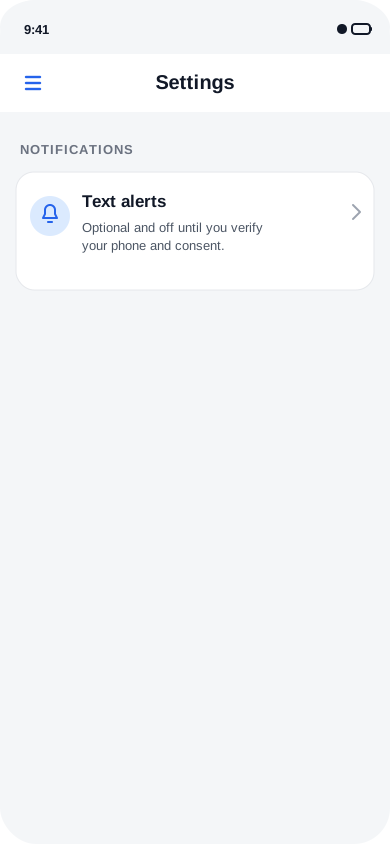
1. Open Text alerts from Settings
A signed-in user opens Settings, then selects Text alerts under Notifications. This enrollment flow is not part of onboarding.
Open the evidence image
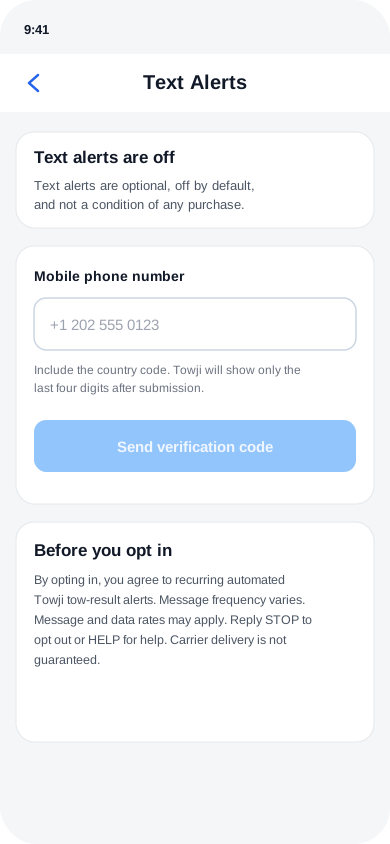
2. Verify phone ownership
The user enters a mobile number with country code and completes SMS verification. Phone verification does not enable alerts.
Open the evidence image
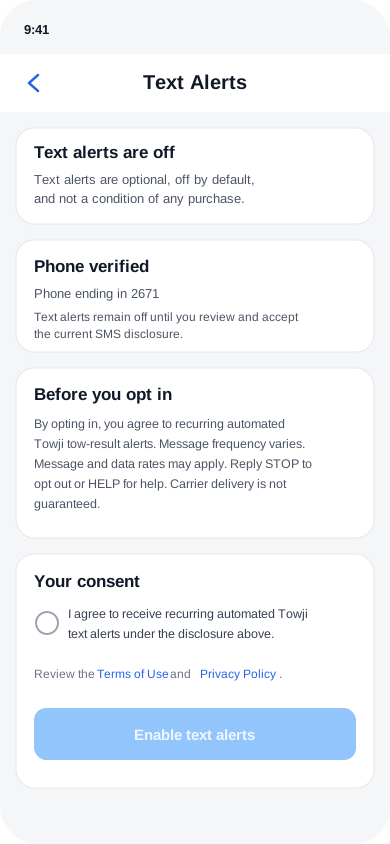
3. Make a separate affirmative choice
After verification, the consent checkbox starts unchecked. Enable text alerts remains disabled until the user selects the checkbox.
Open the evidence image
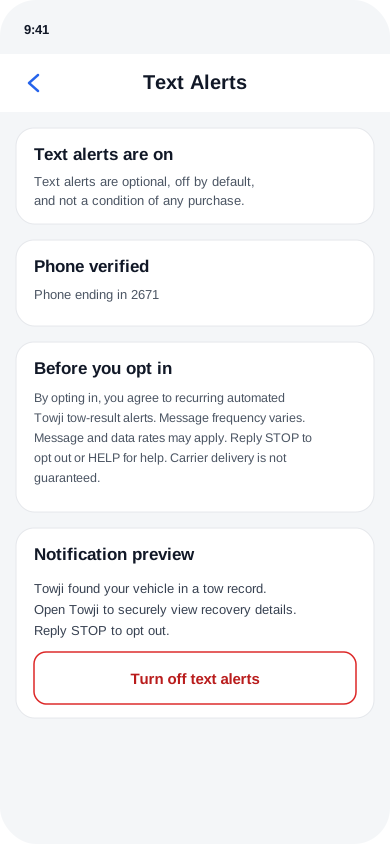
4. Control or revoke consent
An enrolled user can turn alerts off in Towji at any time. Replying STOP also revokes messaging permission.
Open the evidence image
Messages Towji sends
Opt-in confirmation (sent once)
Towji: text alerts are on. We'll text you if a vehicle you monitor matches a tow record. Msg frequency varies. Msg & data rates may apply. Reply HELP for help, STOP to opt out.
Tow-result alert
Towji found your vehicle in a tow record. Open Towji to securely view recovery details. Reply STOP to opt out.
Towji does not place a license plate, VIN, location, tow facility, fee, link, phone number, or recovery detail in a text message. The signed-in app or website is the only place where the user can review a possible match.
Disclosure displayed before consent
By opting in, you agree to recurring automated Towji tow-result alerts. Message frequency varies. Message and data rates may apply. Reply STOP to opt out or HELP for help. Carrier delivery is not guaranteed.
The separate checkbox reads: “I agree to receive recurring automated Towji text alerts under the disclosure above.” It is initially unchecked, and the Enable text alerts button in the mobile app or Turn on text alerts button on the web remains disabled until the user selects it.
Privacy, support, and opt-out controls
Mobile information, including phone numbers, text messaging originator opt-in data, and consent, will not be shared with third parties or affiliates for marketing or promotional purposes.
Reply STOP to revoke messaging permission. A later START reply only restores carrier permission; the user must separately re-enable text alerts inside Towji. Users can also select Turn off text alerts in mobile Settings or Turn off in the signed-in web Dashboard → Monitoring → Text alerts card.
For help, reply HELP or email support@towji.com.